
Promo offers can come with strict time windows, eligibility rules, and step-by-step mechanics that affect who qualifies and when rewards can be claimed. Coming across an older GameZone promo poster, a forwarded screenshot, or a past social media caption can create the impression that an offer still runs—yet promotions can expire, get edited, pause without notice, or apply only to selected account types.

For players in the Philippines, verifying a GameZone promo before joining can reduce confusion and lower the risk of acting on outdated or misleading announcements. A quick verification flow can focus on source checking, validity dates, updated mechanics, and confirmation through official GameZone channels.
Quick Guide: How to confirm if a GameZone promo is still active
A workable way to check a GameZone Promo involves opening the official GameZone site, locating the current promo listing, and reviewing the published validity period, terms, and redemption rules. Eligibility checks can cover account type, verification status, and participation requirements. When promo details look incomplete, mismatched, or outdated, contacting official customer support through the verified site can help confirm whether the promo still accepts participants.
1) Start with the official GameZone website, not forwarded links
Promo checks can begin with identifying the original source of the announcement. A clipped screenshot from a group chat or a reshared image post may not include updated conditions, follow-up advisories, or revised deadlines.
A safer approach can involve typing the website address directly in a browser instead of clicking unfamiliar promo links. After reaching the site, checking the Promotions area or the most recent official announcements can help confirm whether the offer still appears as active content.
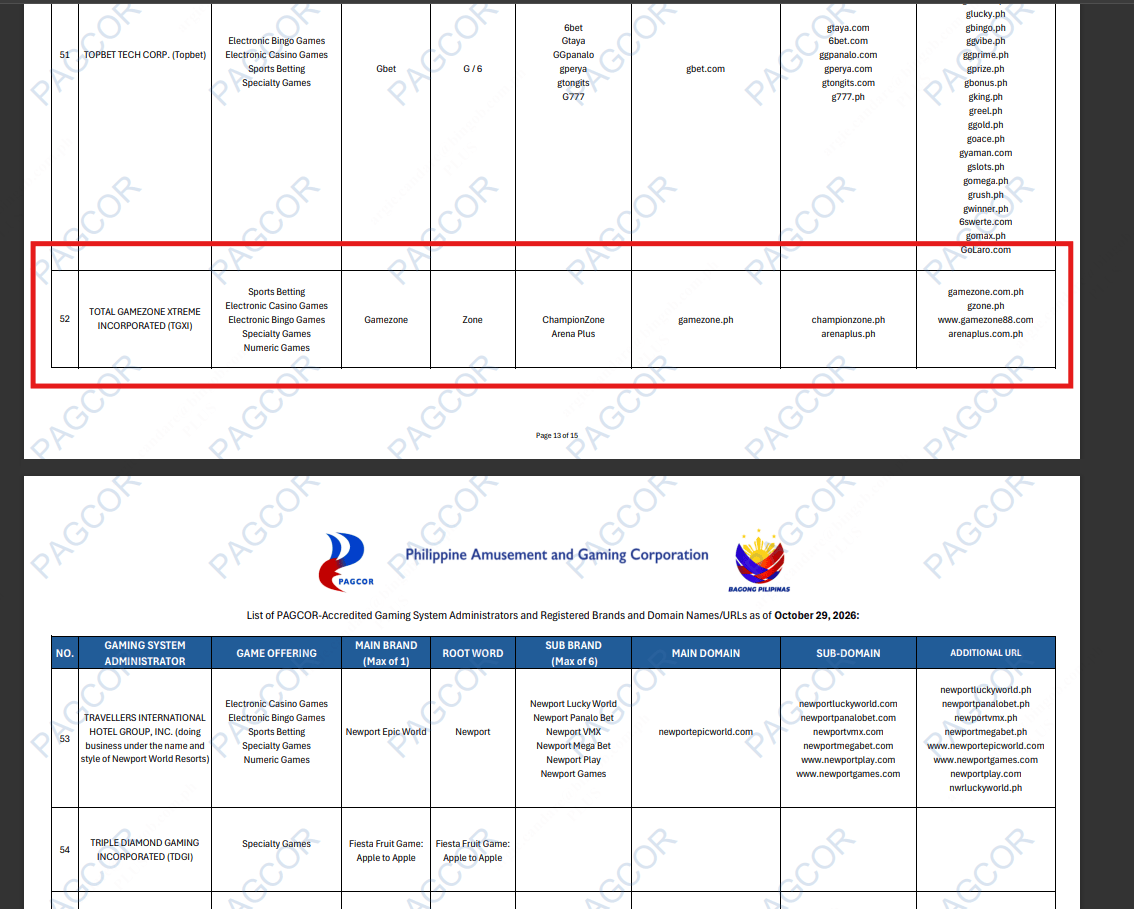
Regulatory references can also help when verifying domains. PAGCOR’s registry dated January 29, 2026 identifies GameZone under Total Gamezone Xtreme Incorporated, listing gamezone.ph as the main domain and gzone.ph among additional URLs. Because registries can change over time, checking the most recent available PAGCOR listing can help confirm the current official web addresses.
Branding alone can mislead. A logo, familiar name, or copied banner design cannot automatically prove that a promo ad is authorized or still running.
2) Review the promo’s validity period and the separate deadlines inside it
Promo announcements can carry more than one timeline. Many offers include different cutoffs for joining, completing requirements, and redeeming rewards. A complete validity review can look for:
- Start date for when the promo begins
- End date for when participation closes
- Claiming or redemption deadline for when rewards must be collected
- Schedule limits such as specific days, sessions, or time slots
Different deadlines can create common misunderstandings. A promo might allow registration until a certain date but require the reward claim days earlier than expected. Checking only the join-by date can lead to missed redemption windows.
3) Read the mechanics and eligibility rules before attempting to claim
Even if a promo shows as active, it may not apply to every account. Many GameZone promotions use eligibility filters such as account age, verification completion, opt-in steps, participation thresholds, or limited participant pools.

GameZone promo as of November 11, 2026
A careful promo check can include:
- new-player only vs existing-player only eligibility
- verification requirements tied to account status
- minimum play, login, or transaction conditions
- limited-slot or invite-only restrictions
- reward usage conditions that affect withdrawal, wagering, or expiry
A common scenario can involve a “welcome” reward designed only for newly registered accounts. Existing users may see the same post online and assume the reward remains available to them, even when the fine print restricts participation.
Platform terms can also include age and account requirements. GameZone’s published terms indicate restriction to qualified individuals aged 21 and above, making age eligibility part of the validation process.
4) Compare older promo posts against today’s official listing
Older promo pages can stay searchable long after the offer ends. A promo poster can remain visible in search results even when the redemption period has already passed. A strong verification habit can involve comparing any older announcement with the newest official promo listing.
Key checks can include:
| What to check | Why it helps |
| Publication date | shows how old the announcement is |
| Stated expiration | confirms the official end of participation |
| Current listing | indicates whether the promo still appears as active |
| Eligibility section | confirms who can join right now |
| Mechanics | reveals changed requirements or steps |
| Redemption rules | clarifies when and how rewards can be claimed |
5) Watch for changes, amendments, or termination clauses
Promotions can change while still being advertised. Updated eligibility categories, reward availability, participation requirements, and deadline adjustments can appear in revised terms.
GameZone’s general promo terms indicate that promotions can include additional conditions and may be changed or ended. Because of that, relying on a saved screenshot, a copied caption, or an older repost can miss important edits.
Conflicting official details can also happen—for example, two posts describing slightly different deadlines. When conflicting information appears, confirming the controlling terms through official support can help determine which conditions apply and whether participation remains eligible.
6) Use official customer support when details look unclear
Promo pages sometimes lack the detail needed to confirm status, particularly when screenshots circulate without full terms. In those cases, using a support channel accessed from the verified GameZone site can help confirm whether the offer still runs.
Useful details to share with support can include:
- promo name or headline
- publication date or where it was seen
- the terms shown on the post
- the specific question: active status, eligibility, redemption cutoff, or requirements
Common mistakes when checking GameZone promos
Avoidable missteps can include:
- relying on saved screenshots as proof of validity
- overlooking the redemption deadline while focusing only on the start/end date
- skipping eligibility rules tied to account type or verification
- trusting shared links without confirming the domain independently
- reading only the headline while ignoring detailed terms
Frequently asked questions
How can an expired GameZone promo be identified?
Checking the stated validity period and comparing it with the latest official promo listing can help. When expiration details are missing, official support can confirm current status.
Can older GameZone promos return?
A previous promo can be reintroduced, but an old post cannot confirm renewal. A fresh official announcement with updated dates and conditions can serve as the reference.
Can GameZone change promo mechanics?
General promo terms allow changes or termination, so reading the latest version of the offer’s conditions can remain necessary.
Where can legitimate GameZone promos be verified?
The official GameZone site and its announcements can serve as the primary reference point, with PAGCOR records providing additional domain verification support.
Promo checking and responsible participation
Promo interest can increase spending pressure, especially when a deadline appears close. Responsible gaming reminders can include sticking to personal limits and treating promotions as optional entertainment rather than a financial plan. Eligibility rules, platform requirements, and responsible gaming guidance can remain part of a complete promo validation routine.

You must be logged in to post a comment.